GDC 2019 Talks – Into the Breach and Dead Cells

April 11, 2019

2019 GDC Vault

Talks

GDC 2019 – Into the Breach’ Design Postmortem

By: Matthew Davis
From: Subset Games

GDC 2019 – ‘Dead Cells’: What the F*n!?

By: Sebastien Benard
From: Motion Twin

Into the Breach Design Postmortem

Constraint Focused Design: This basically has them set constraints as early in the game design process as possible that help direct and restrict future design choices. This can be something like a genre, or a game mechanic like health.

Gameplay focused design: They approach making games by starting the the main gameplay they want to create, and then building everything else to fit around that. Everything such as narrative or theme ends up following the gameplay.

They used a very board game inspired design for “Into the Breach”. They like to keep numbers small, easy to understand, and meaningful. The difference from 1 to 2 should be impactful. This also leads into how they designed enemies. There is a “chess-like” feel to enemies, and the overall gameplay in general, in that the player should have a good understanding of how a piece operates and its zone of danger it creates and be able to play around that.

Randomness was something to be kept to a minimum. This went very well with the idea of having the enemies forecast their attacks. Again, this also ties in with making as much information available to the player as possible. Even though they wanted to reduce randomness to a minimum, they still implemented it when they deemed it a much better option.

As most game designers do, they wanted a strong focus on interesting decisions. This led to keeping out a lot of complex systems that were too difficult to use for what they really brought to the game. This was also done a bit differently on their team since they only have two people, so they could iterate quickly and often and scrap ideas and designs much more easily.

‘Dead Cells’: What the F*n!?

They really wanted to focus on “permadeath” as a game mechanic. Focusing on this led them to some core mecahnics to “make death fun”. The core of this was death being a way to progress in the game. It gave you a way to improve your character’s abilities, as well as access previous areas again (since the game does not allow back tracking).

They wanted to focus the design on combat, NOT platforming. Even though it is still a 2D platformer, they really wanted the player to use their skills for fighting and limit or even remove punishments for platforming. To achieve this, they used many small mechanics such as allowing players to jump a few frames after leaving a platform, teleporting the player onto a platform if they missed a jump by a few pixels, and implementing an edge grabbing mechanic.

This player helping system in platforming got carried over into over mechanics as well, such as helping aim attacks. If the player is facing the wrong direction when going for an attack, the game can actually assist them and switch them around the other direction. I initially was very against this concept, but I appreciated their take on it and was much more accepting after their explanations. This helped reduce the mechanical demands for the game, rewarding the player much more for strategic combat gameplay. Then in this way, this actually allowed them to make the game more difficult in some respects since the player wouldn’t be punished for these less important game aspects.

Just a small note, since they use a lot of community feedback to update their game, they will leave comments in the patch notes stating who inspired the change. This is just a good way to let the community know how impactful they are and make them more willing to help in the future.

2019 GDC Vault Opening

April 9, 2019

2019 GDC Vault

Talks

GDC 2019 – Into the Breach’ Design Postmortem

By: Matthew Davis
From: Subset Games

GDC 2019 – Cursed Problems in Game Design

By: Alex Jaffe
From: Riot Games

GDC 2019 – How to Teach 5 Semesters of Game Design in 1 Class

By: Jason Wiser
From: Yaya Play Games, Tufts and Harvard University

GDC 2019 – Creating Customized Game Events with Machine Learning (Presented by Amazon)

By: Africa Perianez
From: Yokozuna Data

The 2019 GDC vault has finally opened! I just wanted to take a quick peak and see if I could find any interesting talks to watch in the near future. I really loved playing Into the Breach, so I’m excited to check out their Postmortem. Riot Games always has interesting talks with League of Legends size and popularity. The other two just seemed like interesting sounding titles that I’d like to hear more about.

Houdini Assignment – Fuse and Group

April 8, 2019

Houdini Assignment

Fuse and Group

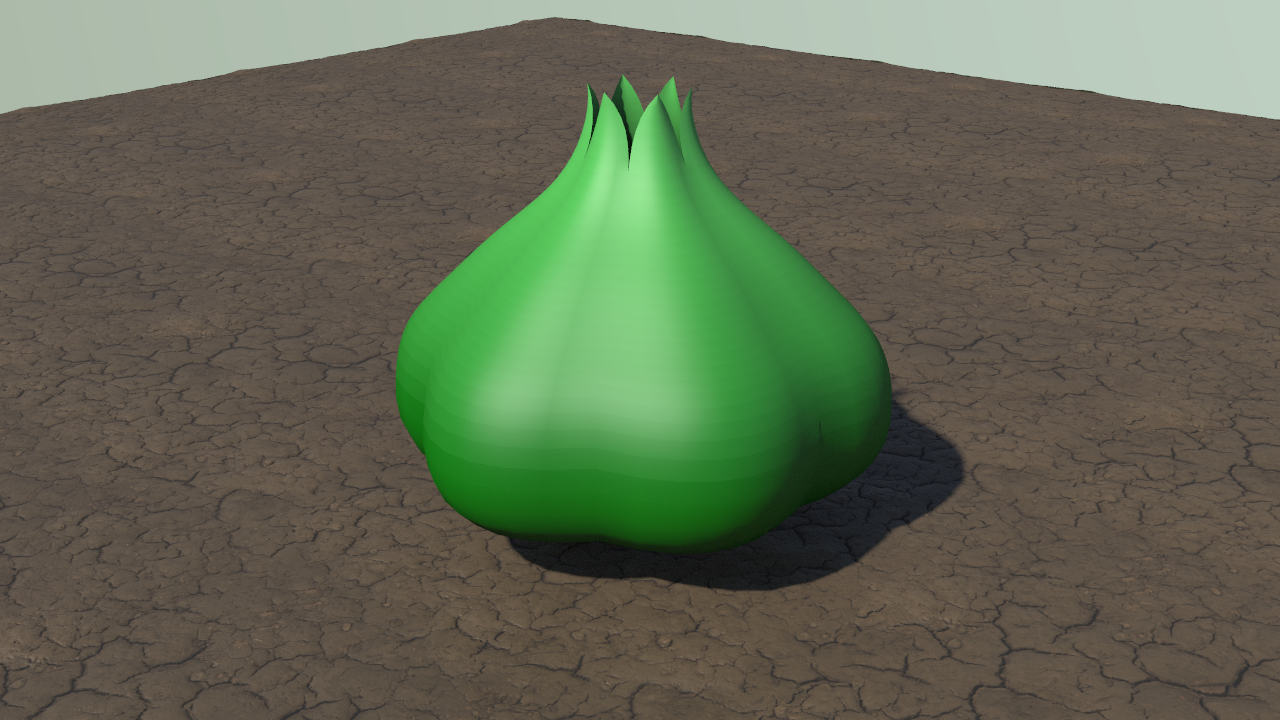
I worked on a Houdini class assignment to make a basic model and decided to try and create the bulb on the back of a Bulbasaur, a Pokemon that is half plant and half dinosaur. I figured I could use a lot of the basics we learned in class to get me pretty far, while also needing to cover a few new things to get it exactly how I wanted it.

In class, we created a basic hot air balloon. This consisted of tracing a curve over a background reference image of a hot air balloon, creating a section of the balloon from this original curve, then replicating that section as many times as needed to fully encompass the full balloon. These were a lot of principles I used for creating my bulb.

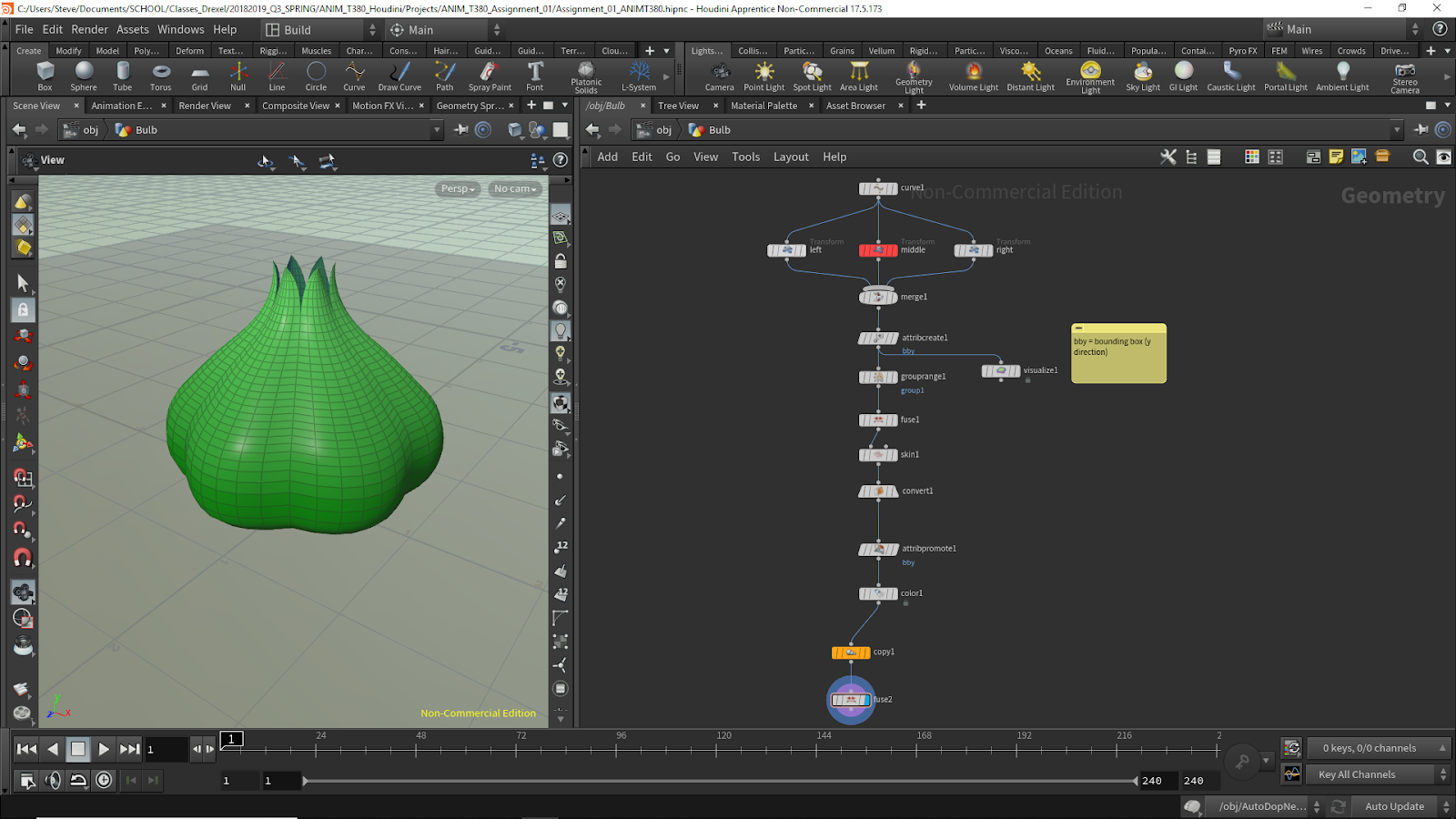
The biggest hurdle I needed to overcome was that that top of each of my sections would all need to connect at a single point, so I would need some additional nodes after simply creating a “left” and “right” variation of my additional curve making up a single segment. I decided to approach this by using a grouprange node and an additional fuse node.

The grouprange node allowed me to create a group consisting of the three points at the top of each curve. I changed the “Group Type” to points, since I was interested in point objects, and I adjusted the “Range Filter” according to how many points I had on my curve. By setting the “Range Filter” to “Select 1 of 8”, where 8 was the number of points in each curve (since they were all similar copies of each other), I could create a group that was all of the first points on the curve, which happen to be the top ones.

I then followed this with a fuse node to snap these three points together into one. The way I was able to get the best result was by setting the “Group” to the group I created in the previous node, and using the “Snap” version of the fuse node. When I increased the “Snap Distance” a significant amount, all the points combined into one to create the tip of the leaf-like structures of the bulb.

Intro to Python Programming with Mosh – Pt. 03

April 7, 2019

Intro to Python Programming

Tutorial – 03

Youtube – Learn Python 3 for Machine Learning & Web Development [2019]

By: Programming with Mosh
Progress

End Time: 1:16:25

Next Part of Tutorial: Project: Weight Converter

NOTES

Arithmetic Operations

In Python we have the same operations used in math, as well as a few extra ones. There is addition, subtraction, multiplication, and division.

Here are a few of the extra operators. By using //, it returns the integer of the division with no remainder. Using the modulus, %, it returns the remainder after performing the division. Finally, ** is exponent, so this will raise a number to the other values power.

Then there is the augmented assignment operator. This is done by placing the operator directly before the equal sign. For example:

x += 3
is the same as: x = x + 3

Operator Precedence

This is the math concept where certain operations are performed before other operations. Many of these in Python are the same as those in basic math.

Math Functions

This just covers so more basic math functions: round, abs

Round rounds your value to the nearest integer. Abs returns the absolute value of a number.

If you want to do very intense mathematical calculations, you will want to grab a math module to add to Python. This module would give you more built in functions to perform mathematical functions. This is done by typing:

import math

at the top of your Python code. You can then call functions from it in your code with math.FUNCTIONNAME.

if Statements

The syntax of if statements is a bit different from C#. The syntax is as follows:

if STATEMENT:
functionsToPerform()

A colon is used to end the if conditional, and the functions following it are determined just by the indentation. To end the statement, you just remove the indent.

To perform else if, you simply type elif in Python. Else remains the same as you type the full word.

Logical Operators

These are the AND, OR, and NOT operators. In Python, logical AND, OR, and NOT are done by simply typing the word “and”, “or”, or “not” in the place they are needed. They do not use symbols.

Comparison Operators

These are used to compare variables with values. These are operators such as greater than and less than. These are all the same as C#, including the equivalency operator that is ==. Not equal is also the same, which is !=.

Using Notion the Note Taking App

April 5, 2019

Notion

Note Taking App

Youtube – Your First Day with Notion | A Beginner’s Guide

By: Keep Productive

Notion was a note taking app recommended to me by a friend and I wanted to give it a try. I’ve just started getting into the basics of it but it gives you a lot of freedom and a lot of options so I wanted to look into a beginner user tutorial like this one to help get myself oriented. This seems like a really useful app that I believe will help me organize my activities in the future.

Using Lens Studio for Snapchat Filters

April 4, 2019

Lens Studio

Making Snapchat AR Filters

Lens Studio – Snapchat

This site allows a user to download the software necessary to create your own Snapchat filters. This was a thing introduced to me in a VR/AR class as another simple way to explore the uses of the technology and get a hand on working with it. I’ve already had experience working with VR and AR in Unity, so this will be another nice way to just discover some ways to work with that type of technology.

Using Houdini with Unity

April 3, 2019

Using Houdini with Unity

Houdini Unity Plug In

Youtube – Houdini Engine | Create an Asset for Unity
Youtube – Houdini Engine for Unity
Youtube – Procedural Workflows with Houdini and Unity 2018 for Game Artists | Kenny Lammers | SIGGRAPH 2018

By: Houdini

After starting a Houdini procedural modeling course today, I wanted to start looking into ways to easily implement the assets into Unity. These videos help with that basic process, as well as showed me that there are basic plugins to integrate Houdini assets into Unity with some of their procedural properties in tact still.

The last video is also a very technical implementation of using Houdini within Unity to help with track design for a driving-type game. It begins to really show the power of using Houdini to develop live game assets.

Houdini Basics

March 29, 2019

Houdini Basics

Interface and Physics

Youtube – SideFX Houdini For Absolute Beginners
Youtube – PHYSICS For Absolute Beginners – SideFX Houdini Tutorial

By: Surfaced Studio

As I am on vacation over break, I just wanted to quickly check out some basic Houdini tutorials to go over for my classes next quarter. These ones seemed to cover the absolutely basics as well as getting into some of the simulation aspects I want to check out specifically using Houdini.