Author: digm520admin
DIGM 540 – Engineering Statics Game Concept 00 – Ring with Strings
May 24th, 2018
Engineering Statics Game Concept – 00
Vimeo – Concept for Engineering Statics Game
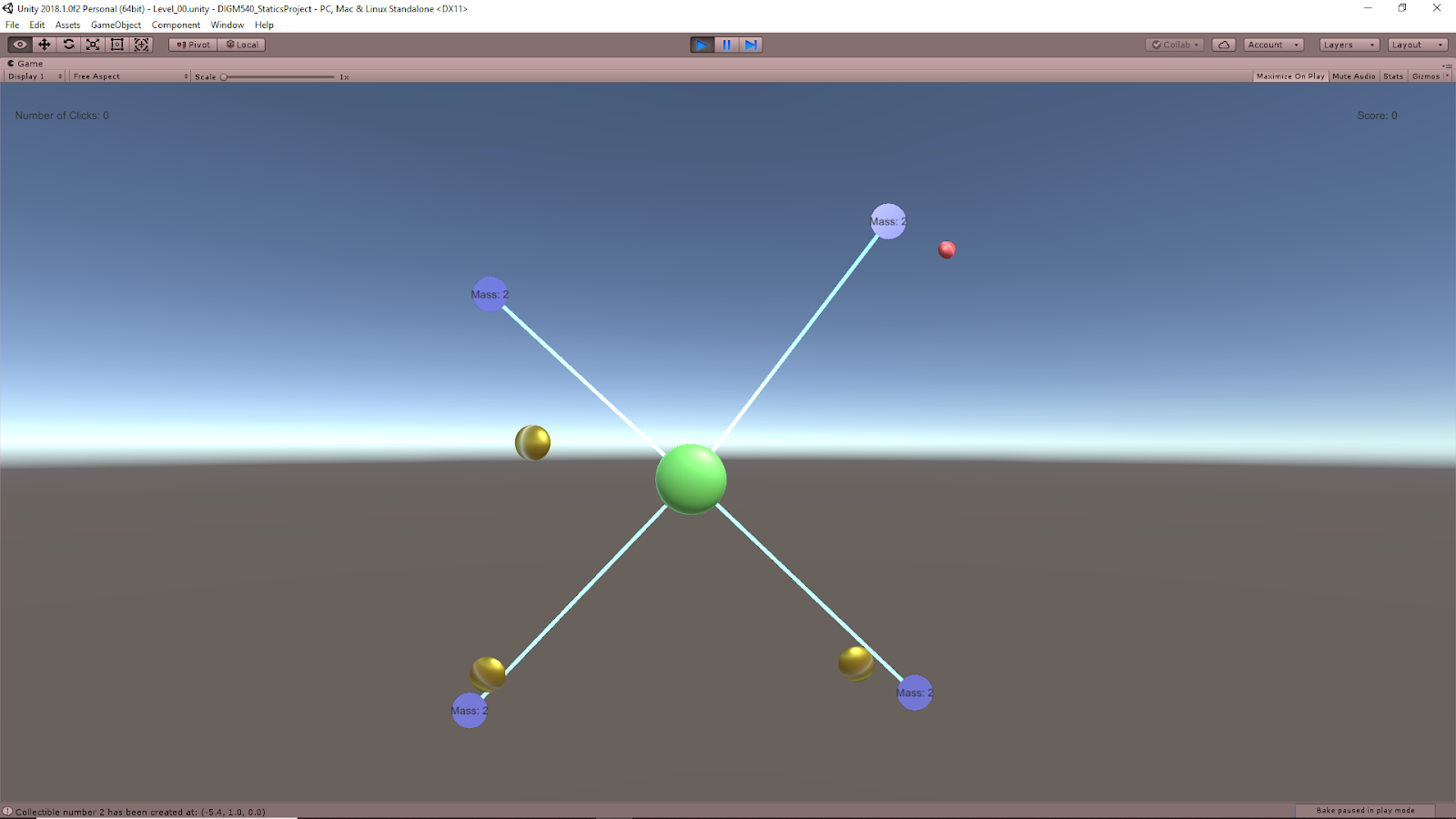
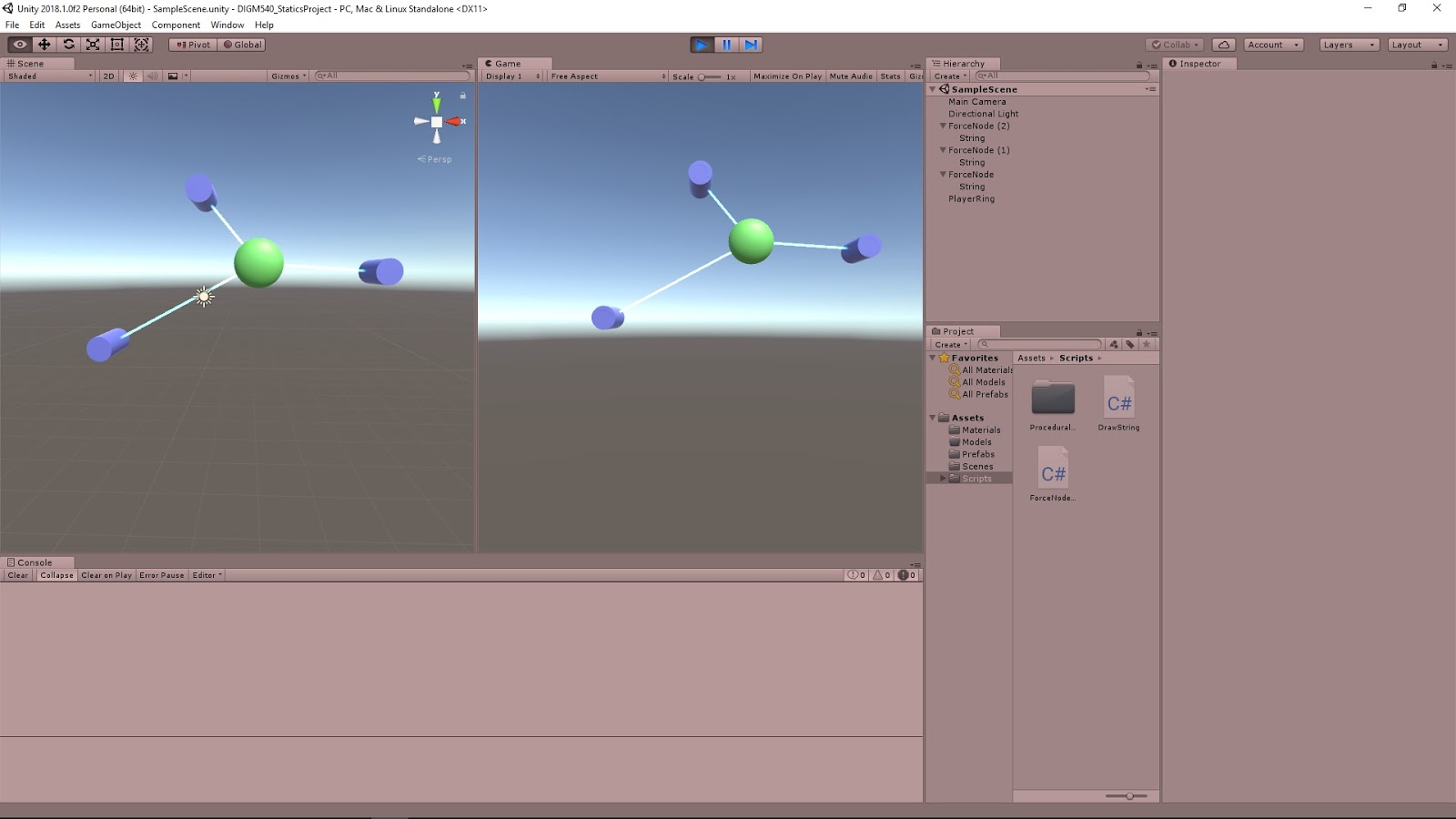
This was a quick proof of concept to show the idea from the last post at work. This concept takes inspiration from the hands on engineering kit that used masses on strings tugging on a central ring object to teach topics such as center of mass and vector math.
The forces from the nodes on the ring are calculated to emulate that of a mass attached to a string. Each node has a mass value associated with it (which would be the mass hanging off of it in the real world kit), and this influences how much force that node is applying to the main circular object. Moving the nodes or changing their mass value will influence the position of the ring, as it effectively represents the center of mass of the entire system through the forces applied by the nodes.
Using a simple example, I was quickly able to run a test to double check if the values provided by this toy were matching that of the true calculations and they did for the single test I’ve run so far. The center of mass equations of a system of particles was used, which can be found here on Wikipedia: Center of Mass – Wiki
DIGM 540 – Engineering Statics Game Project – Forces in Unity
May 23rd, 2018
Forces in Unity
AddForce – Unity Official Tutorials
Youtube – AddForce – Unity Official Tutorials
The bare basics of scripting forces in Unity with rigidBody’s. The AddForce can take two inputs: a vector for direction and magnitude, and what type of force it is.
ForceModes
- Acceleration – Continuous change; not affected by mass
- Force – (Default) Continuous change; affected by mass
- Impulse – Instant change; affected by mass
- VelocityChange – Instant change; not affected by mass
AddTorque – Unity Official Tutorials
Youtube – AddTorque – Unity Official Tutorials
The bare basics of scripting torques in Unity with rigidBody’s. The AddTorque can take two inputs: a vector axis to apply torque around, and what type of torque it is. This is very similar to AddForce. Important to remember, Unity uses “LEFT HAND RULE” for rotation.
ForceModes
- Acceleration – Continuous change; not affected by mass
- Force – (Default) Continuous change; affected by mass
- Impulse – Instant change; affected by mass
- VelocityChange – Instant change; not affected by mass
Game Ideation
Engineering Teaching & Research Equipment – Armfield
EF-1.1 – Statics – Forces experiment kitYoutube – EF series video Statics Forces 1 1 3
The links are similar videos, the first is just directly to the site of those that made the kit, and the second is a Youtube link. This kit provides hand on experience for understanding a lot of topics based around static equilibrium. Topics such as 2D shape center of masses, force vectors, and much more can be covered with this tool.
Game Idea – Engineering Statics Game
Following the general idea of the kit shown above, the game environment is populated with nodes that apply controllable forces to a central ring object. These forces can be altered to change the position of the ring. The environment will spawn collectibles that the player must direct the ring towards in order to collect them. To move the ring, they will need to intelligently alter the forces applied by the nodes.
Quick sketch of concept
Talks Every Game Designer Should Watch
May 23rd, 2018
Talks Every Game Designer Should Watch
These are two talks suggested to be seen by anyone in game design by Squirrel Eiserloh in his talk “GDC 2015 – Math for Game Programmers: Fast and Funky 1D Nonlinear Transformations”. They cover general game design topics on making your game feel good no matter the concept.
Juice it or lose it – a talk by Martin Jonasson & Petri Purho
Jan Willem Nijman – Vlambeer – “The art of screenshake”
May 22nd, 2018
Research Papers on Procedural Content Generation for Games
Darwin’s Avatars: A Novel Combination of Gameplay and Procedural Content Generation
by: Dan Lessin, Sebastian Risi
Citation: [Lessin & Risi, 2015] D. Lessin and S. Risi, “Darwin’s Avatars: A Novel Combination of Gameplay and Procedural Content Generation,” 2015, pp. 329–336.
Key Terms:
- Evolved Virtual Creatures
- Artificial Life
- Muscles Drives
- Physics-based Character Animation
- Procedural Content Generation
Summary
Use evolved virtual creature (EVC) system from Lessin et al. reference to procedurally generate creatures that provided interesting control and locomotion problems. Originally these were piloted by an AI trying to learn how to move, but this “brain” was removed for this paper so that players could run them. Movement was determined by the activation of muscles/actuators between the procedurally generated segments of the creatures. These muscles could range in value from [0, 1], where 0 is fully relaxed and 1 is fully activated. Players would press keys to activate muscles in an attempt to move the creature.
The morphology of the creature was made up of PhysX primitive (cubes, spheres, and capsules). Body in original paper was coevolved with the locomotion system to help ensure that the creature had successful ways to move. The gameplay was compared to QWOP and Incredipede
The conclusions were: novel combination of gameplay and procedural content generation made possible by evolutionary computation, a new way of unique creature control with 3D creatures not created by the user, and game can generate novel control challenges on its own.
Further Sources to Look Into from This:
- [8] M. Mitchell. An Introduction to Genetic Algorithms. MIT Press, Cambridge, MA, USA, 1998.
- [15] N. Shaker, G. N. Yannakakis, J. Togelius, M. Nicolau, and M. O’Neill. Evolving personalized content for Super Mario Bros using grammatical evolution. In Proceedings of the Artificial Intelligence and Interactive Digital Entertainment Conference (AIIDE 2012), Menlo Park, CA, 2012. AAAI Press.
Petalz: Search-Based Procedural Content Generation for the Casual Gamer
by: Sebastian Risi, Joel Lehman, David B. D’Ambrosio, Ryan Hall, and Kenneth O. Stanley
Citation: [Risi et al., 2016] S. Risi, J. Lehman, D. B. D’Ambrosio, R. Hall, and K. O. Stanley, “Petalz: Search-Based Procedural Content Generation for the Casual Gamer,” IEEE Transactions on Computational Intelligence and AI in Games, vol. 8, no. 3, pp. 244–255, Sep. 2016.
Key Terms:
- Collection Mechanics
- Compositional Pattern Producing Networks (CPPNs)
- Procedural Content Generation
- 3-D Printing
Summary
This research explored the use of PCG for a casual, social, collection mechanic focused game. In this research it also explored the effects of PCG on markets for in game economies and translation to real world objects with 3D printing.
The game uses procedural generation along with AI to create an Interactive Evolutionary Computation (IEC) system to create the flowers in the game. The generator is a modified compositional pattern producing network (CPPN) and the evolutionary algorithm chosen was Neruoevolution of Augmenting Topologies (NEAT).
The game focuses on users breeding flowers which can be seen by other players. These other players can “like” their flowers or purchase ones that are put up for sale. Breeding is done by three methods: pollination (allow for natural mutation through a single flower), cross pollination (combine traits of two different flowers), and cloning (simply replicate a flower). The player’s selection of what and how to breed is the interactive part of this IEC system, which allows the user to employ a search-based method of exploring the PCG design space.
To help provide a goal for players, this research also looked into creating a guided categorization system using the inherent properties of the parametric PCG technique used to create these flowers. They took advantage of the fact that this technique can lead to spatial design spaces where objects near each other in the design space will also tend to have similar aesthetic attributes. They explore this further with a Self-Organizing Map (SOM).
May 20th, 2018
Sources to Learn Procedural Generation Techniques for Games
Procedural Generation in Unity
Unity Tutorial: A Procedurally-Generated Galaxy – Part 1 by: quill18creates
Youtube Link to Part 1 of Tutorial
A tutorial to look into for basic procedural generation of a galaxy in Unity. Also has some information on different variable types in C#.
Unity – Cellular Automata Tutorial
Unity Link to Cellular Automata Tutorial
Tutorial directly from unity on the basics of using the procedural generation technique of cellular automata.
May 20th, 2018
Procedural Content Generation in Games
Galactic Arms Race (GAR)
Youtube Link – Evolving Particle Weapons in Galactic Arms Race | AI and Games
by: AI and Games
AI and Games briefly describes how GAR uses evolutionary algorithms to design weapons that the player likes using. The player takes the place of the fitness function to determine what is “good”. Techniques such as CPPN and cgNEAT are lightly touched upon and offer topics to be further explored.
May 19th, 2018
Math for Game Programmers – Talks from GDC – Notes
GDC 2015 – Math for Game Programmers: Fast and Funky 1D Nonlinear Transformations
Presenter: Squirrel Eiserloh
Notes:
- Other names used for these concepts in other fields:
- Easing functions
- Filter functions
- Lerping functions
- Tweening functions
- Implicit vs. Parametric Equations
- Implicit: Ex. x^2 + y^2 = R^2
- Parametric: Ex. Px = R * cos(2*pi*t); Py = R * sin(2*pi*t)
- Parametric Equations use a single variable (usually a float) as input
- Opportunities to Use Parametric Transformations
- Anywhere you have a single float to change
- Anywhere that could be expressed as a single float
- Anytime you use time
- The two most important number ranges in mathematics and computer science are:
- 0 to 1: Good for fractions and percentages
- -1 to 1: Good for deviations from some original value
- These functions are normalized
- Input of 0 has output of 0, and input of 1 has output of 1
- The in-between values are those that vary function to function
- Types of functions
- Smooth Start: exponential functions with various orders
- Ex: t^2
- Smooth Stop: gives opposite feel of smooth start
- Ex: 1 – (1-t)^2
- Mix functions
- Crossfade: mix but “blend weight” is the t parameter itself
- Scale: multiply something by t; can also multiply functions together
- Bezier Curves
Other suggested talks:
Juice it or Lose it – by: Martin Jonasson and Petri PurhoThe art of screen shake – by: jan willem Nijman vlambeer
Math for Game Programmers – Talks from GDC – Notes
GDC 2013 – Math for Game Programmers: Interaction With 3D Geometry
Presenter: Stan Melax
Notes:
- Basic Vector Math
- Dot product
- Cross product
- Outer product
- Jacobian
- Determinants
- Geometry Building Blocks
- Traingles and planes
- In games, triangles and planes need to know above and below
- Triangles use normals
- Planes use Ax + By + Cz + D == 0
- Ray-Triangle Intersections
- Ray-Mesh Intersection
- Could check against all triangles, but there are ways to remove some for efficiency
- Need to check if you’ve hit the nearest triangle
- Mesh must be intact, can have issues if there are holes
- Convex Mesh
- Neighboring face normals tilt away
- Volume bounded by number of planes
- Every vertex lies at/below every other face
- Convex used because it makes a lot of tests/calculations simpler
- If point lies under every plane, it is inside
- Can move rays as they intersect triangles
- Convex Hulls
- Techniques for converting meshes into convex meshes
- There are two main techniques:
- Expand Outward – start with small mesh and expand out until all vertices are accounted for
- Reduce Inward – start with a large mesh and shrink it down to fit all vertices
- Convex Decomposition: breaking down complex shapes into separate convex meshes
- Objects in Motion – Spatial Properties
- Find the center of triangles, then the center of tetrahedrons
- Find the area of triangles and the volumes of tetrahedrons
- These properties can be used for basic accurate physics simulations of objects
- Time Integration without Numerical Drift
- Forward Euler update versus Runge Kutta update
- Forward Euler applies derivative at every step, which can give inaccurate results in too large of time steps
- Runge Kutta looks at multiple time steps and their derivatives and takes a weighted average to make steps more consistent
- Soft Body Meshes
- Connect points/vertices of mesh with spring-like connections
- Two main techniques:
- Kinematic: can have issues with stressed state oscillating as it will not come to rest, forces continue to act
- Dynamic: has better resting stressed states that will settle down
- How to learn more
- Practice tinkering with your own physics engine code
- Write gjk algorithm
- Help understand physics engines and their limitations
May 13th, 2018
Procedural Generation
Unite 2016 – The Power of Procedural Meshes
Unity Talk by Alexander Birke
Suggested Reading:
“Essential Mathematics for Games – A Programmers Guide” by James M. Van Verth & Lars M. Bishop
Links to examples to learn about procedural generation of meshes
Notes from talk:
- Why use procedural meshes?
- Player Made Content (Ex. Spore)
- Unique Mechanics (Ex. Gish)
- Procedural Generation (Ex. Sir You’re Being Hunted)
Unity Procedural Meshes
- Mesh starts by creating vertices, and then making triangles from those vertices
- Components Needed:
- MeshFilter – stores the mesh
- MeshRenderer – shows the mesh
- Script – to generate the mesh
- Normal vectors used to determine surface orientation
- Colors
- Used to be determined by assigning values to vertices
- Can be used to provide more information to vertices still
- Can be done as bytes or floats
- Bytes generally better
- UVs
- 2d coordinates for each vertex
- Used to map textures
- Create vector2d array to assign to mesh object
- Setting Trangle Indices
- Most difficult part
- Find common features of topology that repeats
- Draw it out to help find these patterns!
- Delaunay Triangulation
- Maximizes angle of all angles of triangles in triangulation
- Good for GPU rendering since skinny triangles can lead to visual artifacts
- Port of triangle.net can be found in an above link
- Debugging Procedural Meshes
- Very important to do
- Use Gizmos and Debug classes
- Rotate camera to check if tris are facing correct direction
- Turn on wireframe rendering
- Optimizing Meshes
- StaticBatchingUtility: batches multiple game objects together into fewer drawcalls but where each can still be culled
- Mesh.CombineMeshes: Puts many meshes into one, good if individual meshes not likely to cull, but can break things if not done carefully
- Optimizing Dynamic Meshes
- Mesh.MarkDynamic: allocates a memory buffer of sorts to designated mesh to let graphics API know mesh data will change often
- Base data structure to store data in is flat arrays when possible
- Lists can be used too, especially if you are unsure how many vertices you will need before creating mesh
- Frustrum Culling
- Skinned Meshes
- Multithreaded Mesh Generation: Unity API not thread safe
- Compute Shaders
- GPU great for running parallel tasks
- Only available on modern platforms: PS4, Xbone, DirectX 11, OpenGL 4.3, OpenGL ES 3.1
- Unity can cross compile with these options
Summary
Procedurally generating a mesh starts with creating vertices, and then triangles from these vertices. Normals and UVs can be added to this data for more informed meshes. In Unity, your mesh will need a MeshFilter and MeshRenderer component. Debugging your mesh is important, and some tools in Unity to help with that are the gizmo and debug classes, moving the camera around, and turning on wireframe rendering. There are also several options to look into to either optimize your existing meshes how they are, or compute them more efficiently.
More to Research
- Bezier Curves: parametric mathematical curves used commonly in generating computer graphics
- Use of GPU to do parallel calculations, and how to connect that with Unity scripting
- Thread and Multithread Mesh Generation: Not sure what this actually meant
- Computing shaders
- Talk through Unity by “Sir You’re Being Hunted” on 3D Mesh Generation
May 7th, 2018
AI Wish List from GDC
AI Wish List: What Do Designers Want out of AI? – GDC Vault
GDC Talk with Raph Koster, Dave Mark, Richard Lemarchand, Laralyn McWilliams, Noah Falstein, and Robin Hunicke. They go over what directions they would like AI to move in in the future to further good game development.
Some Topics Discussed:
- Content Creation: Don’t focus on procedurally generating a tree, or a forest of trees. Generate interestingly varied trees that have other interactive elements within/about them to create a much more detail-rich environment that could not be created by human hands in any practical way. Create a world, with a forest, with a pond, with tadpoles that you can interact with.
- Feelings to Invoke: Feeling Proud for something. Have the player feel proud that they were able to guide something else to perform an action on its own.
- Create systems of interactivity that decentralize the player. Make the player understand that their actions are upsetting a balance. Make the player see that their actions affect other lives, even NPC lives.Example: A player arrives at a procedurally generated world with procedurally generated pink moles that have built up an entire ecosystem and have a history. These moles will then react to the player arriving and their actions/decisions, but also carry on with their own lives, which they would have done regardless of whether a player ever arrived or not.