Basics of System.Random in C#

February 14, 2020

System.Random Methods

C# and Unity

Random Class (from Microsoft)

Information – Link

By: Microsoft


General Methods Looked Into

Random.Next

This selects a random integer either between 0 and maximum value, or between two different designated values.

Random.NextDouble

This generates a random floating point value between 0.0 and 1.0. This is the main one I will be looking to use since I have a lot of parameters where floating point values make sense, however since it only returns values between 0.0 and 1.0 specifically, I will have to just use it as a random multiplication factor.

Random.NextByte

This requires an input of an array of bytes. It will then fill that array with random byte values.

Why I am Investigating

My thesis project uses a lot of random values with its focus on varied procedural content generation, but I want to control the randomness a bit more with the implementation of a seeding system. A tutorial I did a while back on cellular automata uses a very basic seeding system for its randomization that I was looking to copy. It centers around this line where seed is just a string variable that can be set in the editor:
System.Random psuedoRandom = new System.Random(seed.GetHashCode());

As long as the seed string is the same and a value is randomly selected using this Random variable psuedoRandom, the value selected for that particular case will remain the same over multiple plays of the program. This helps provide control and consistency to the random system generation so if I find good samples they can be recorded by their seed string.

Random.Next and Random.NextDouble are going to be the main two that I use, as they help generate random ints or random floating point values (doubles that can be cast as floats if necessary). Random.Next will be very useful in cases where I am generating a specific number of objects, where Random.NextDouble will be used to generate the varied values for parameters that are within specific ranges (such as the length or size of an object). As noted previously Random.NextDouble can only specifically generate values between 0.0 and 1.0, so it will be used as a random multiplication factor to get the results I need.

UnityLearn – Beginner Programming – Creating a Character Stat System – Pt. 03 – Accessing Variables in Our System Part 1

February 12, 2020

Beginner Programming

Creating a Character Stat System

Accessing Variables in Our System Part 1


Beginner Programming: Unity Game Dev Courses

Unity Learn Course – Beginner Programming

Accessing Variables in Our System Part 1

Equipping Weapons

They mostly just created the scriptable object, ItemPickUp_SO, for now so that the base of the EquipWeapon method would work. This method simply adds a designated amount to the character’s base stats.

Equipping Armor

Here they created two separate enums within ItemPickUp_SO to define options for the types of items and options for the types of armor. These enums on the scriptable objects were actually very nice in the editor as they provided drop down lists easily accessible to the designer.

The EquipArmor method in CharacterStats_SO used a switch statement, which goes well with enums. They however performed the same calculations with every single case (adding the different values to the player’s resistances), so I think it would be cleaner to just perform this calculation directly after the switch statement.

Un-Equipping Weapons

Using bool return type methods is useful for equipment systems since you normally want two different events to occur depending on if the player can and successfully equips the item, or if they are unable to equip the item. In their case, they just check if a weapon pickup is the same as the current weapon with the bool field within the bool method UnequipWeapon method. It also checks if there was previously a weapon, and it will destroy the current weapon, set it to null, and return the currentDamage to baseDamage.

Un-Equipping Armor

The UnequipArmor method followed the same idea as the UnequipWeapon method, where it had a return type of bool and returned a value based on whether the item passed in (the item being unequipped in this case) matched the item currently equipped to the player. Since this dealt with armor, they used a switch case again to account for all the various armor types so they could direct the actions at a specific armor slot on the character. This check was similar to what was done in UnequipWeapon again, as it checked if the current slot matched the item being unequipped and then adjusted the current stats (resistance in this case) to the base value and set that item slot to null.

This was repeated for every armor type in the switch case, with the slight difference that they had to change the item slot (specific ItemPickUp field on this particular CharacterStats_SO object). I found it easier to just create a helper method that took in an extra ItemPickUp parameter to determine which ItemPickUp slot was the one being tested and have that method do all the work for that specific slot. This way I only needed that block of code once in the script and only needed a single line for each case in the switch statement.

This ensures everything is uniform (which it currently is according to the tutorial) and keeps the code more organized and cleaner. This may have to be edited if different events are needed for different armor types in the future on unequip, but it’s much better currently.

SUMMARY

  • Enums are very nice on the editor side for scriptable objects since they provide an organized list of options to work with
  • Using bool return type methods can be useful with equip systems
  • Identify repeated code in switch statements to clean/organize code

UnityLearn – Beginner Programming – Creating a Character Stat System – Pt. 02 – Damage, Leveling Up, and Death

February 12, 2020

Beginner Programming: Unity Game Dev Courses

Creating a Character Stat System

Damage, Leveling Up and Death


Beginner Programming: Unity Game Dev Courses

Unity Learn Course – Beginner Programming

Damage, Leveling Up and Death

Encapsulation and Item Pickups

They cover encapsulation again just to explain why they use different access modifiers for different fields and methods within the scriptable objects they are creating to deal with the character’s stats and items.

Stat Increasers

They covered methods that increased the stats of the character. They were pretty basic, where they added values to specific stats and checked if the value would go over the max value to set it directly to max if that was the case.

Stat Reducers

This was very similar to Stat Increasers methods, but with subtraction and checked if the value would go below 0. This made me realize there’s a better way to do this where you check if a value would go below 0 BEFORE actually performing the operation, and then set it to 0 if that is the case. This prevents cases where you make a value negative for any step in the code which could result in weird problems down the road.

Leveling Up and Dying

They took an interesting approach to the level up process. They created a new class within the CharacterStat_SO scriptable object named CharLevelUps. These CharLevelUps objects just contained a bunch of int and float fields for different stats, and would be the amount to increase those base stats upon attaining the next level.

They then created an array of these CharLevelUps objects in the CharacterStat_SO class. You could then see this array in the editor and set a number of them to create (in this case, it would dictate the max level of the player). The designer could then set the individual values for each of these stats for each CharLevelUps object in the array to tell the system how much to increase each stat specifically upon attaining that specific level.

SUMMARY

  • Control your encapsulation when dealing with scriptable objects
  • Make sure to have checks for max and min values when modifying stats
  • Creating new classes that just hold a bunch of fields and then creating an array of those classes can be a very nice modfiable tool for a designer to work with

Unity Learn Tutorials – Artificial Intelligence for Beginners and Intro to Optimization

February 7, 2020

Unity Learn Tutorials

Note: The AI tutorial require Unity Learn Premium to access
Artificial Intelligence for Beginners

Tutorial Series #1 – Link

By: Penny de Byl


Introduction to Optimization with Unity – 2019.3

Tutorial Series #2 – Link

By: Unity Technologies


Notes

These were both tutorial series I saw on Unity Learn that I wanted to note specifically to check out later. The Optimization tutorial is a very small series, so I can look into that rather quickly, but the AI series is a 15+ hour comprehensive class so that will take a large commitment to fully cover.

The AI series however is something I am interested in in general and even covers some topics I am specifically looking into at this time. Some of these topics include: Navigation Meshes, Crowd Simulation, State Machines, and Goal Driven Behavior. This would be very good to follow for my own personal interests as well as possibly being useful for some projects I am looking to work on.

GDC 2020 Talk – Cursed Problems in Game Design

February 6, 2020

Cursed Problems in Game Design

GDC 2020 Talk

GDC 2020: Cursed Problems in Game Design

Video – Link

By: GDC – Alex Jaffe (Riot Games)


Notes

Cursed Problem: an unsolvable design problem, rooted in a conflict between core player promises

Politics: competition through social negotiation, alliances, and manipulation

The main skill here is identifying cursed problems so you know to avoid them or navigate them so you do not waste time on “solving” them.

Examples from Talk: Hard or Cursed?

No Man’s Sky: Exploration game with millions of worlds
Hard: This was evidenced by the game becoming successful after significant time updating the game, but it easy to see this was just a hard problem and not an impossible one.

Diablo: Loot games with efficient trading
Cursed: Many loot experiences are just incompatible with efficient marketplace trading systems because the loot experience relies on the random drops themselves feeling unique or special to the player, but having a market to deal this loot for other loot just makes every type of loot “gold”, or currency, and the specialness of all drops is significantly hampered.
Commodified Reward Problem supports this idea.

Pokemon GO: always-on location-based games
Cursed: These games look to provide an augmented reality layer to real life for rewards, but the counteracting topic is just the general need for personal safety and convenience. The main core of it being cursed is that one is “play anywhere/any time” and the other to make them safe is to “only play when appropriate”.

4 Core Solution Techniques for Cursed Problems

The 4 techniques are: Barriers, Gates, Carrots, S’mores

Barriers

Cut affordances that break promises

This technique focuses on just preventing the player from performing actions that would break the design promise.

Exapmle: Free-For-All Politics (Fortnite, or any large battle royale game)
Approach: Limit player’s agency over one another
Sacrifce: Some of the PvP fantasy of control
The game is so large scale with so many players, high amount of missing information, and high lethality so the political game is not very feasible to develop. It is hard to create an alliance or single out a specific targeted player with all of these variables. This however removes the feeling of “I have outplayed you specifically” or the personal level of domination since the game is so large scale.

Gates

Hide bad states behind challenge

This technique aims to make it harder to find bad ways to play the game so that players will hopefully focus on the good ways intended.

Example: Free-For-All Politics (Playstation All Stars: Battle Royale (4 Player Brawler))
Approach: Limit visibility of players’ success
Sacrifce: Some of the tension of buzzer beaters
They hid the score of each player, and made the scoring system a bit convoluted (2 * kills – deaths) so it was harder to reason out in the middle of the high paced game. This was done to encourage every player playing their best with less fear of being targeted for being in the lead and reduce politics factors. Not being sure of the score however can reduce high tension moments near the end of the game sine no one is really sure who is in the lead and you do not even know who won until they game tells you.

Carrots

Incentivize avoiding the bad states

Provide incentives for players that do not go into the bad game states.

Example: Free-For-All Politics (Catan tournament)
Approach: Add meta-game effects
Sacrifice: Magic circle of an individual game
In a Catan tournament, players play many games and their standings are used to add to their total score for placement. This makes getting first less of a “be all, end all” scenario and incentivizes each player to just do as well as they can. They suggest this ends up reducing overall politics in the game since players are continually incentivized to do their individual best. The con however is that it just makes each individual game feel less special or “magical” to play.

S’mores

Make it fun

This technique leans into the bad states of the game and just make them fun to play as well.

Example: Free-For-All Politics (Diplomacy)
Approach: Give players tools for deep political play (e.g. secrecy)
Sacrifce: Emphasis on moment-to-moment action
The game of Diplomacy goes hard into the politics with secrets and deception along with the gameplay, which can make the political aspects more fun and interesting. This however generally makes the game itself feel like it is taking a backseat (in this case your plays with your units) and leaving players mostly focusing on the relationships they make or break along the way.

Summary

Do not think of these as solutions, but as a small design framework. These techniques were identified to help you approach difficult problems you find in the design process for making a game to help you navigate them more efficiently. It can also just be beneficial to understand some problems are not “solvable” and you will have to make sacrifices to accomplish some goals or mitigate some negative aspects.

Challenges

These were some challenges given as examples of problems so cursed that they really have not been approached very much.

These are the challenges:

  • Balanced player-generated content in multiplayer games
  • PvP games in which all players feel there was a just outcome
  • Mystery and discovery in the age of the internet

The last challenge really resonated with me as something I have investigated, specifically through the concept of procedural content generation.

As an avid Pokemon player I would always go into the new games knowing every new pokemon from information released before hand, whether it was from strategy guides back in the Johto days to the games in the Alola region. I however stumbled upon player made rom games and played them mostly blind and enjoyed them much more. The sense of discovery and figuring things out was so much more interesting and refreshing.

I then got into Pokemon randomizers where you can randomize as much or as little as you want, and that game fresh new life to old games I had played. This gave me the idea for using procedural generation, something akin to the rogue likes of today, but in a more exploratory or experimental way. I think you could look into procedural generation of the rules of the game as opposed to just specific content, and the player could have consistent ways to discover these rules playing the game each time. This way the player’s skill of discovery is really what is emphasized and rewarded as they get better, and they use this core skill to get better at whatever world they are put into.

Exploring NavMesh Capabilities

February 5, 2020

NavMesh

Unity Tutorials

Unity NavMesh Tutorial – Basics

Tutorial #1 – Link

By: Brackeys


Navigation Mesh Basics | Unity AI Pathfinding (Part 1) | Table Flip Games

Tutorial #2 – Link

By: Table Flip Games


Use Unity3D NavMeshAgent.Move to customize your navigation control

Tutorial #3 – Link

By: Jason Weimann


Crowd Behaviours on a Dynamic Navmesh in Unity Part 1

Tutorial #4 – Link

By: Holistic3d


Notes

I am looking to explore Unity’s NavMesh to see what features it has to compare with A* Pathfinding, especially my setup I worked on specifically. I want to see the benefits it readily provides over A* as well as see if I can find any useful features that could be implemented in some way into A*.

Tutorials 2 and 4 both are the beginning of series so they can be useful for exploring deeper into NavMesh. Jason Weimann in tutorial 3 is also generally a good source for exploring features more deeply at a more advanced level.

Thesis: Starting Table of Sources for Related Works and Background Section

January 27, 2020

Thesis Paper

Related Works and Background Table

SUMMARY

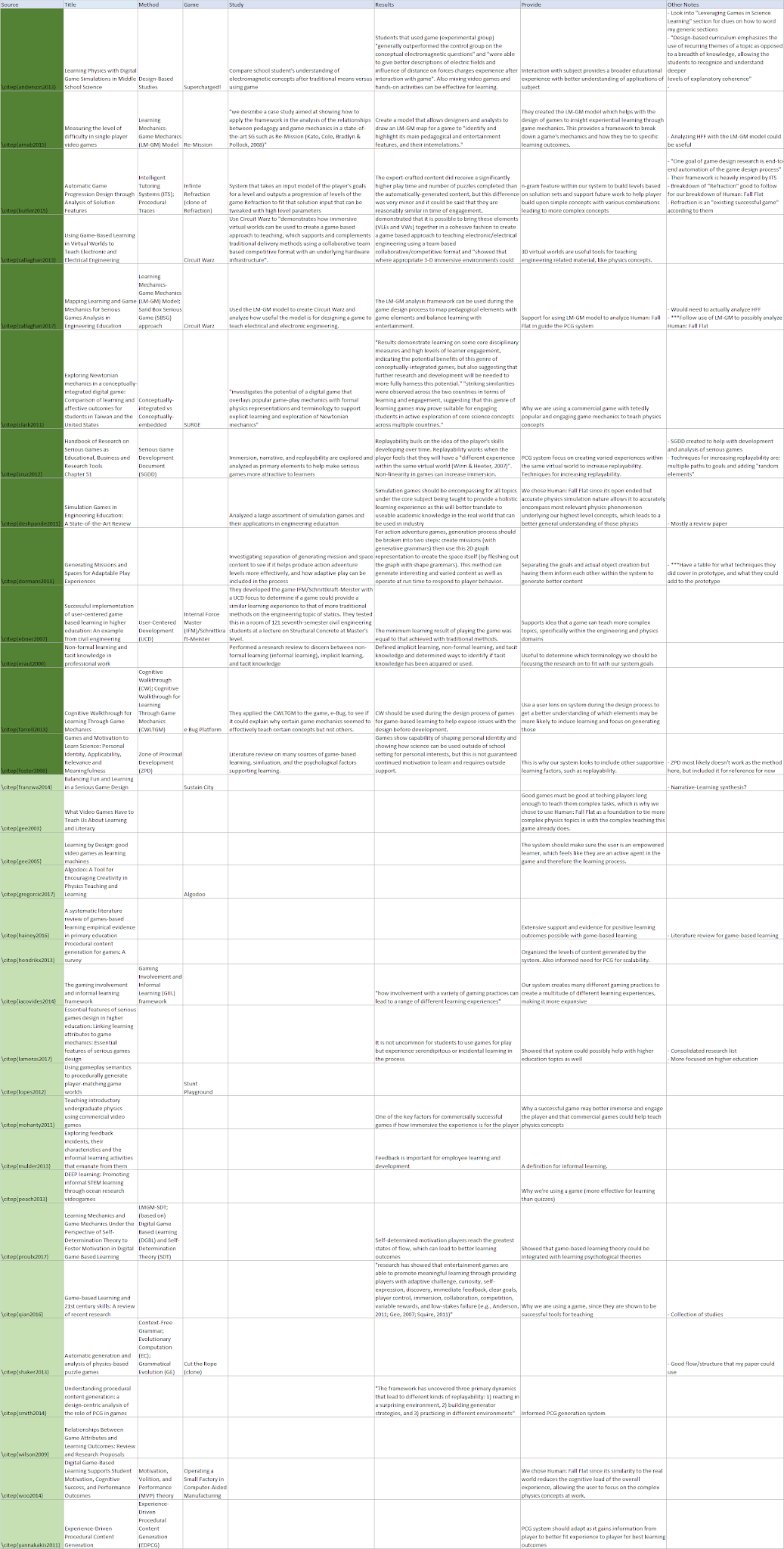
The newly named Related Works and Background section for my thesis paper contains a lot of references to my many sources and how they connect with my research and project. We are now looking to add a table to this section to help organize all of these sources and show the reader more clearly what each source did and how it was incorporated into my thesis. As of now there are slightly over 30 sources referenced in this section, so I have only started to create this table.

Since the table is still in the early drafts, it uses a bit of short hand. There are eight columns: Source, Title, Method, Game, Study, Results, Provide, Other Notes. This is the breakdown of what those sections each entail (the parenthetical is the general question that section looks to answer, and the following text is more description for clarification):

  • Source – (What is it?) This is my latex name for the source
  • Title – (What is it?) Title of the research paper, article, etc.
  • Method – (What is the interesting aspect?) Ex. PCG Technique, Theoretical Framework, etc.
  • Game – (What game did they use/develop, if any?)
  • Study – (How did they do their research?) What tests did they perform/how did they reach their conclusions?
  • Results – (What did they acheive?) Their findings and conclusions from their research
  • Provide – (What did it provide to our project/research?) How did this source influence our research or how the project was designed
  • Other Notes – Extra notes that won’t be in the final table but are useful to keep in mind when putting it together or may be used in the table instead of something else

The image quality is not very good but that was as good as I could get it for Blogger at this time.

Image of Table in Current State

By: Me – Table for Thesis Related Works and Background Section Describing Sources Referenced

Building Unity UI that scales for a real game – Prefabs/Scenes? by Jason Weimann

January 24, 2020

Unity UI

Scaling and Scenes

Building Unity UI that scales for a real game – Prefabs/Scenes?

Youtube – Link

By: Jason Weimann


Notes

UI is a big part of a lot of games, so it is something that is always good to learn more about. This also deals with using UI that works across multiple scenes, so this could possibly be another route to take when dealing with the new scene management techniques I have looked into.

Thesis – HFFWS Project Update – Finishing/Fixing Foundation of Pulley Scenarios

January 17, 2020

HFFWS Generation System

Fixing Pulley Scenario Foundation

Pulley Scenario Issues

Not Producing Designated Number of Scenarios

This was working before, so it was weird that the issue came up for all three pulley options after updating, including the original scenario I worked on, HeavyDoor. I found that the wheel positioning method was getting an array index error, so I focused around there.

Instances where just one wheel needed to be created seemed to actually work fine, so there was something about creating multiple wheels that was causing an issue. I looked into what was happening after the first wheel was created, and there is a method dealing with the list of weighted ranges that can remove a range without adding any new ones after choosing a position (this option exists for when a chosen position is within the buffer range on both sides of it to other taken positions, or ends).

It would make sense that we get an indexing error if we started with one range (which it always does), but then because of the chosen parameters, removed that single range from the list. This appeared to exactly be the case. The generated ropes weren’t long enough, so choosing a single position with the given buffer ranges was effectively taking up the whole rope, so there were no valid positions left, giving an error and ending the cycle of generating scenarios.

As a quick fix just to continue testing, I simply changed the parameters to only give longer ropes and this removed the error completely. To at least help notify the user of this problem in the future, I added a Debug.LogError if the range list is empty but the system tries to find a new position. This will be something I will need to come back to later to increase the intelligence of the system to so that it itself modifies either the length of the rope to fit the chosen number of wheels, or reduces the number of wheel options depending on the rope size (most likely the latter choice).

UnityLearn – Beginner Programming – Creating a Character Stat System – Pt. 01 – Overview and Creating Scriptable Objects

January 8, 2020

Beginner Programming: Unity Game Dev Courses

Beginner Programming: Unity Game Dev Courses

Unity Learn Course – Beginner Programming

Project Overview

General Overview of Creating Character Stat System Tutorials

  • Defining and Configuring scriptable objects
  • Accessing data inside of scriptable objects
  • Setting up helpful debugging items
  • Scriptable objects inside of monobehaviours

Creating Scriptable Objects

Scriptable Objects Explained

Scriptable objects are very effective for creating designer tools.

Systems Map: image showing the separate pieces of the game system and how they all connect, in a web-like design

SCriptable Objects: data containers of which, we can have multiplie instances

  • Defined by programmer
  • Treated as assets in Unity
  • Easy for designers to work with
  • CANNOT be added to gameObjects as components

The basic template for turning a script to a scriptable object is adding a [CreateAssetMenu()] header to the top of the script and having the class inherit from SCriptableObject. The CreateAssetMenu header is what adds the scriptable object as an option in Unity’s own Asset Menu at the top of the screen. This also holds the information on how it is displayed there.

Again, it is important to note that scriptable objects CANNOT be added to gameObjects as components. This is worked around in the tutorials however by adding them as a field to a Monobehaviour that is located on a gameObject.

Debugging the Aggro Radius

This segment mostly dealt with importing the project if you had not already, and doing some folder organization for these tutorials. They also added a bool to control showing aggro radius of enemies.

Building Your Scriptable Object

The first scriptable object they create is called CharacterStats_SO.
The CreateAssetMenu tag used at the top of the script is directly used to store this information in an item in the drop down menus of Unity itself. This is why there is a fileName and a menuName.

MenuName: This will be the string seen in the drop down menus directly. You can also add a “/” to create a chain of drop downs where the item will be located.

The fields used for CharacterStats_SO:

  • bool setManually: this will determine if the stats were created manually, or created dynamically
  • bool saveDataOnClose: this will determine if data should be serialized, or written to disk, on close
  • The rest are just general player stats fields (health, damage, resistance, etc.)

SUMMARY

These tutorials were just the tip of getting introduced to scriptable objects in Unity. The rest of the tutorials in this set will delve deeper into the topic and how to incorporate them into other Monobehaviours.