GDC Talks – GDC 2023 – Designing Marvel Snap

General

Designing ‘MARVEL SNAP’
by: Ben Brode
https://youtu.be/HjhsY2Zuo-c?list=PLJOqkQc0u8tyt9J6tHrmeg7sp8IJlS54L

Other Videos Referenced:
Hearthstone: 10 Bits Of Design Wisdom
by: Eric Dodds
https://youtu.be/pyjDMPTgxxk

How I Got My Mom to Play Through Plants vs. Zombies
by: George Fan
https://youtu.be/fbzhHSexzpY?list=PLJOqkQc0u8tyt9J6tHrmeg7sp8IJlS54L

Richard Garfield – “Luck in Games” talk at ITU Copenhagen
by: Richard Garfield
https://youtu.be/av5Hf7uOu-o?list=PLJOqkQc0u8tyt9J6tHrmeg7sp8IJlS54L

================================

Notes

They described game designers as chefs that collect ideas as ingredients and mix them together to create games. They reference how someone says they get a lot of ideas by going to game conventions.

Once they determined they were making a collectible card game, they just go out and play as many different versions of that type of game they can find to get inspiration and ideas as these ingredients. They also mention how this can help validate some of your design aspirations because when you see something working it can help confirm this is a decent idea to pursue. This can even help mitigate how much and how fast you need to make prototypes since you can see proof of and test certain mechanics in existing games.

They have this idea of “zero sum games = zero fun”, which I find very intriguing as someone that also looks at games like this at times. As in, what is the net entertainment you are bringing to society from creating a game. This leads them to focusing on enhancing “little victories” as a way to generate more consistent joy, particularly on the losing side, so there is more net joy created. They also just emphasize how single player sided games (it could even be a team of human players, like a PvE game) can more easily generate net joy.

  • They mention there’s a 2014 GDC talk on these Little Victories.
    • Link: https://youtu.be/pyjDMPTgxxk

Depth vs. Complexity

They explained these two terms simply as:
Complexity – cost you pay to play (learning needed to be done)
Depth – the fun part of the game (intereseting decisions you make)

They plot these two concepts on a chart, Complexity vs. Depth, and show that a game can be anywhere on here. They describe games that have significant depth with relatively low complexity “elegant designs”.


Doubling Cube Mechanic

They go into a lot of detail how much this doubling cube mechanic brings to a game. This mechanic is the idea of being able to influence the resulting winnings of a game directly and have the other player determine if they should concede or not based on these changes.

They witnessed that this cube mechanic could help generate significant little victories for the losing players. This was because the losing player could retreat early as the bet was increased, making them feel smart for leaving early before losing more resources.

They believe this also added a lot of depth to the game, similar to how betting and bluffing in poker adds a lot of depth to a rather simple game.


Text Complexity

Text in games, especially when it comes to instructions, is something I explore and encounter a lot and their findings gave a nice hard numerical line for this that I have been floating around for a while. They reference the 2012 GDC talk by George Fan on Plants vs. Zombies for their text rule, which is “Eight words on the screen at any given time”.

I would jokingly just say that players never read any text on the screen, so find a way to help them figure out what to do without any words if possible, so this was good to find that you can at least deliver a few words of instruction to the player that could be used as guidance.

They talk about how they used this principle to keep their individual card text as simple as possible as well. While not always able to fit the 8 word cutoff, they did use this as a starting point for when text was getting large. For actual text understandability they did playtesting where they had anyone raise their hand if they had to read a card more than once to see if they could trim.


Game Story

I love their story tier list for games because I feel that it’s an effective visual representation of how I feel about story in games that is hard to describe to people. They emphasize that an incredible story is still the best type of story to have for a game, but having no story at all is not too far behind, and having a bad story can actually be more detrimental than no story at all.

I would personally lump very minimalistic boring story in with “no story at all” because it does effectively become ignored. That will cost dev time and resources though, so from an actual game development perspective I think that ends up making it significantly worse since you’re getting a similar return to just doing nothing.


Mechanics from Other Games

I mostly wanted to have this section to show how you can just find interesting mechanics individually in games you play and that can be enough to go off of as your ingredient for working on designing a game that has that as a more core element or explores it in a different fashion.

Simultaneous Reveal:
They just found this mechanic very interesting and open, so they wanted to include it. They referenced a Lord of the Rings game like Stratego, and a Game of Thrones: The Board Game. They found just having this mechanic doesn’t work in a vacuum because it’s effectively random without context. Context is a critical secondary element needed to make this mechanic work.

Playing Cards to Locations:
They found this in Smash Up. They liked that this provided an easy point of variability and a point of context for the simultaneous reveal.


Luck vs. Skill

They open this section with their favorite talk of all time by Richard Garfield. They explain how most people see luck and skill as mutually exclusive factors, but they’re actually also plottable on the same graph and games can have any mixture of both.
i.e.
Chess = low luck; high skill
Chutes and Ladders = high luck; low skill
Poker = high luck; high skill

They cover input and output randomness concepts here.
Input randomness: the given inputs are random which give time to adjust (decide after random event).
Output randomness: randomness happens after input (decision) is already given.

As someone that grew up as one of the better local players for all types of games, I initially hated randomness as it provided the main point for me to lose games against people, and I wanted to win all the time. As I got older though, I learned to enjoy and embrace randomness in games, as it could simply provide a way for others to win even when I felt like I played better, which could actually leave us both feeling better about the games. Randomness also gives you a factor to play around as a more skilled player others may not even be aware of that helps you consistently win more, even if it doesn’t mean winning every game, which again can give you those feelings of “feeling smart” on your own, even if other players aren’t even aware.


Final Details on Core Game Loop

They wrap the talk up with some points on how they brought all their design ingredients together. They found the locations could help influence metas and provide a strong point of variance over game life, so they prepped a lot of locations to slowly add to the game after launch, had different rates for locations to change meta, and would swap out locations to also impact metas.

They talked about how changing the game siginficantly is just easier with smaller teams than larger teams. They mentioned how some UI decisions actually impacted game mechanics, like targeting being confusing on a mobile game so they just removed a layer of targeting from their game mechanics entirely to fit their targeted game platform and feel.

Doppler Effect in Mario Kart – Game Audio – by Scruffy

July 1, 2021

Doppler Effect and Audio Controller

Game Audio


Title:
Mario Kart and the Doppler Effect

By:
Scruffy


Youtube – Information

Description:
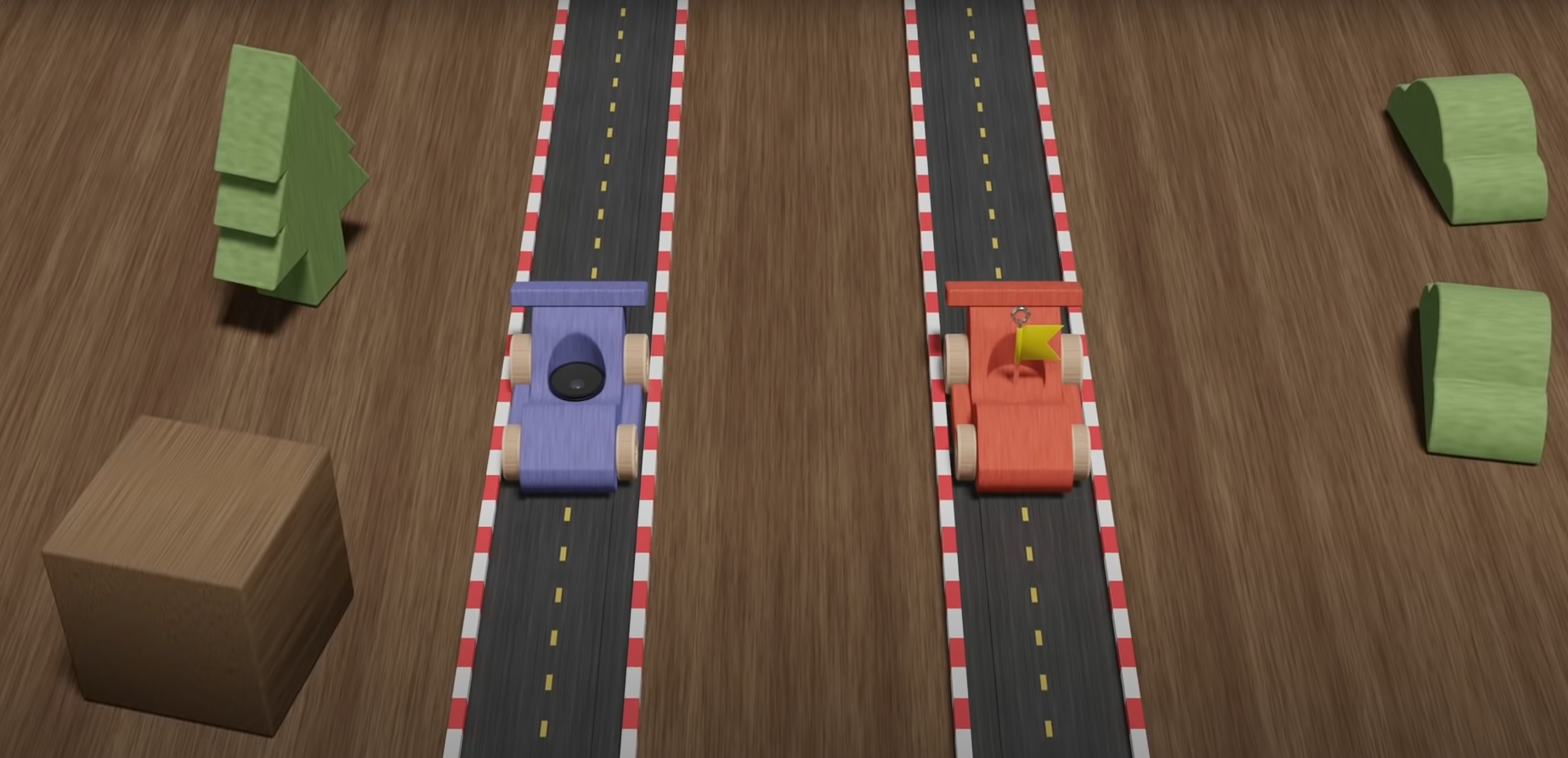
Explanation of how Mario Kart creates the doppler effect and efficiently distributes audio to multiple players.


Overview

This video covers how Mario Kart Wii specifically uses the doppler effect, as well as just how some of their audio systems work in general. It is decent coverage of how to implement a basic doppler effect system into a game in general.

Fig. 1: Image from “Mario Kart and the Doppler Effect” Video Above by Scruffy

Setup of Doppler Effect System

The key is the relationship between sound frequency and relative velocity of objects. Their approach to measure this is just by measuring the distance from the audio source to the audio listener each frame, and if there is a difference, that is used for a relative velocity term. This relative velocity term is bound to some negative and positive scale (one direction meaning higher frequency and the other being lower frequency). The way this relative velocity maps to a difference in sound frequency can use any mathematical relationship to fit whatever feels best (i.e. linear, logarithmic, etc.).

They break this core down into three basic steps:

  1. Get distance between source and listener each frame
  2. Subtract from previous for rate of change
  3. Map rate of change to determine sound playback speed (to taste)

Expansion of the System and Efficiency

This explanation shows the direct relationship between an audio source and an audio listener, but games tend to have many audio sources. They show how immediatley this can at least be simplified by having some audio distance so the calculations only need to be performed on objects within a certain distance of the listener. The other big part of simplifying the system is just limiting which sources implement the doppler effect. Not every sound needs to use this, so it can be removed from many standard sources (i.e. the crowd in Mario Kart).

Split Screen Solution

This is fairly niche, but still interesting. With split screen, the audio of multiple listeners needs to come through a single audio output. Since they may experience different levels of the doppler effect for the same audio sources, they needed a solution to provide an experience that does not sound like a mess. Their approach was that each player only makes sound in their own camera (so one player is not listening to the other on the same screen), and when dealing with outside sources, only the player closest to the audio source is taken into account. The other player’s audio for that source is simply negated. This is a nice solution as the system already takes the distance between sources and listeners into account anyway.

via Blogger http://stevelilleyschool.blogspot.com/2021/07/doppler-effect-in-mario-kart-game-audio.html

Game Project: Flying Game: Sonic Boost – Part 4 – Projectile and Environment Interaction

June 2, 2021

Flying Game

Projectile


Overview

I was trying to think of ideas on how to add an extra mechanic to the flying controller that ties in with a fast and agile moving controller, and thought of tying in some type of sonic boom effect. With this, I thought creating an expanding projectile from the player after boosting could be an interesting way to generate these projectiles. I then explored a few ways to have the projectile interact with the environment and came across a relatively simple one that provides some fun feedback.

Sonic Boom Projectile

Everything about the projectile is rather simple. The projectile is generated when the player performs a fully charged boost. It then expands at some growth rate (dictated by the projectile controller on the player) up until some maximum size (dictated in the same location). As it encounters objects with an IDestructible interface, it will cause them to perform their Destroyed() method.

This gives a pretty cool effect that at least has a minimal basis in real world physics. It also makes tight turns and effective direction changes tied to a boost more satisfying when performed properly. It does have a major flaw currently however in that a majority of the action is normally happening behind the player, so they do not get to witness it most of the time. This is a pretty severe drawback that I will need to investigate some solutions to.

Voxelized Environment Obstacles

I initially liked the idea of creating targets or obstacles that could be destroyed by this growing sonic boom that would deteriorate as the sonic boom moved into it, as opposed to a more general game approach where contact would just do damage and destroys the entire object as a whole. This led me to making a bit more voxelized targets, which were made up of several chunks instead of just being a single large mesh.

To begin, I created a Voxel Obstacle script which is the overall container of a full obstacle made of several voxelized elements. This script just holds 3 dimensional values and builds out a solid cube/rectangular solid based on those dimensions.

The elements that make up the full obstacles are just simple prefab cubes for now, with a VoxelObstacleElement script. That script implements the IDestructible interface just so they have a Destroyed() method for the projectile to interact with.

Initially I had these elements have their gameobjects destroyed on impact with the projectile just to test the interactions. This was an ok approach, and gave the deteriorating effect I wanted that was at least more fun than the whole area exploding immdeiately on impact. However, I explored a more physics-based approach that looked a lot more satisfying. I simply turned the elements’ rigid body component from kinematic to non-kinematic to effectively enabled their physics. This gave a fun tumbling and physics-y effect for the individual blocks as they interacted with the projectile.

This is a decent spot for most of the elements of this small game project, and I think the next step is just building out a better level to test the individual mechanics in. I would also like to add a bit more to the projectile/environment interaction just to make it a bit more impactful. I would also like to remove the strange interaction of hitting the blocks from above, as without any additional force, they don’t really move since they really start by moving downward with gravity being the only force acting on them.

Sonic Boost – Projectile Tests and Environment Voxel Interactions from Steve Lilley on Vimeo.


Video: Sonic Boom Projectile and Obstacle Destruction Showcase (1st and 2nd Iteration)

via Blogger http://stevelilleyschool.blogspot.com/2021/06/game-project-flying-game-sonic-boost.html

Game Project: Flying Game – Part 1 – Introductory Movement and Camera Controller

April 30, 2021

Flying Game

Game Project


Overview

I wanted to do some work on a small, simple 3D game in Unity I could make within a week or so. My original focus is on player movement, and from there I decided to hone in on a flying game of some kind. I have been watching Thabeast721 on Twitch and he recently played Super Man 64 which I have also seen at Games Done Quick (GDQ) events and thought building off of and improving their flying controller could be a fun project.

Player Controllers

Controller #1 – Rotate Forward Axis

My initial thoughts on a basic flying player controller was to have left/right rotate the player on the y-axis, up/down rotate the player on the x-axis, and a separate button to propel the player in their current forward direction.

As a controller standard, I also tend to have the player’s input be received in the Update method to receive as often as possible, but then output these inputs as movement in FixedUpdate to keep it consistent on machines with different frame rates.

	private void Update()
    {
        horizontalInput = Input.GetAxisRaw("Horizontal");
        verticalInput = Input.GetAxisRaw("Vertical");

        if (Input.GetButton("Jump"))
        {
            isMoving = true;
        }
        else
        {
            isMoving = false;
        }
    }

    private void FixedUpdate()
    {
        // Inputs in reverse position for direction vector because that influences which axis that input rotates AROUND
        Vector3 direction = Vector3.Normalize(new Vector3(verticalInput * inversion, horizontalInput, 0.0f));
        Flying(direction);
    }

    private void Flying(Vector3 dir)
    {
        RotatePlayer(dir);
        MovePlayer(dir);
    }

    private void RotatePlayer(Vector3 dir)
    {
		transform.Rotate(dir * rotationSpeed * Time.deltaTime);
    }

    private void MovePlayer(Vector3 dir)
    {
		if (isMoving)
		{
			transform.position += transform.forward * movementSpeed * Time.deltaTime;
		}
    }

Controller #2 – Rotate on Y-Axis but Translate Directly Vertically

With my second approach I wanted to try and emulate the flying controller from Super Man 64 just to see how it felt. It seems like a more acarde-y style of flying with easier controls, so I thought it would be a good option to investigate. For this horizontal rotation (rotation on the y-axis) remained the same, as this is pretty standard with grounded player controllers as well.

The up and down rotation (rotation on the x-axis) however, was completely removed. The up/down inputs from the player simply influence the movement vector of the player, adding some amount of up or down movement to the player. This makes it much easier to keep the player’s forward vector relatively parallel to the ground and is much less disorienting than free-form rotational movement in the air.

	private void Start()
    {
        if (isInvertedControls)
        {
            inversion = -1.0f;
        }
    }

    private void Update()
    {
        horizontalInput = Input.GetAxisRaw("Horizontal");
        verticalInput = Input.GetAxisRaw("Vertical");

        if (Input.GetButton("Jump"))
        {
            isMoving = true;
        }
        else
        {
            isMoving = false;
        }
    }

    private void FixedUpdate()
    {
        // Inputs in reverse position for direction vector because that influences which axis that input rotates AROUND
        Vector3 direction = Vector3.Normalize(new Vector3(verticalInput * inversion, horizontalInput, 0.0f));
        Flying(direction);
    }

    private void Flying(Vector3 dir)
    {
        RotatePlayer(dir);
        MovePlayer(dir);
    }

    private void RotatePlayer(Vector3 dir)
    {
		transform.Rotate(dir.y * Vector3.up * rotationSpeed * Time.deltaTime);     
    }

    private void MovePlayer(Vector3 dir)
    {      
		if (isMoving)
		{
			Vector3 movementDirection = Vector3.Normalize(transform.forward + dir.x * Vector3.up);
			transform.position += movementDirection * movementSpeed * Time.deltaTime;
		}     
    }

Camera Controller

Follow Position

To follow the player’s position, I am using a really simple case where it just follows them at some fixed offset. The offset is originally determined by the initial position of the camera relative to the player, and then for the rest of its run its position is just that of the player summed with the offset.

Where transform.position is the position of the camera object:


offset = transform.position – player.transform.position;


transform.position = player.transform.position + offset;

Rotate to Follow

My first test just to initialize the camera follow was to child it to the player to see how it looked that way. This worked ok for following position, but having multiple rotation influences made this impossible to use quickly at first. As I changed the player controller to a more general, arcade-style, it worked better but was still poor for rotation.

To fix this I put the camera as a child onto a separate empty gameobject. This gameobject could then follow the player and rotate to rotate the camera around the player while keeping it at a fixed offset distance. This also made determining the rotation angle/looking vector from the camera to the player much simpler. Since the camera is rotate downward some, its forward vector is not in-line with the world z-axis anymore. This camera container however could keep its axes algined with the world’s axes. This meant I could just make sure to align this container’s forward vector with the player’s forward facing vector on the xz-plane. To do so it just required the following:

private void RotateView()
{
	Vector3 lookDirection = new Vector3(player.transform.forward.x, 0.0f, player.transform.forward.z);

	transform.rotation = Quaternion.LookRotation(lookDirection, Vector3.up);
}

Unity’s Quaternion.LookRotation method allows me to set the rotation of the object based on the direction of a forward facing vector (lookDirection in this case), with a perpendicular upward vector to make sure I keep the rotation solely around the y-axis.

The following is a quick look at how the final player controller and camera controller interact from this initial prototype approach:

Flying Game Project: Initial Player Controller and Camera Controller Prototypes from Steve Lilley on Vimeo.

Summary

via Blogger http://stevelilleyschool.blogspot.com/2021/04/game-project-flying-game-part-1.html

Planning and Designing 2D Character Controllers: Using Lucid Chart

January 28, 2021

Planning

2D Platformer Design


Lucidchart

Description:
Visualization tool for diagramming and flowcharting.


Overview

I want to begin designing the 2D platformer character controller creation tool, so I looked for diagramming and flowcharting tools and turned to Lucidchart. I have used it a couple times in the past, and thought it would be a good source to go to again for this. It covers both the helpful programming diagramming as well as just general note and design organization is a clean and visual way.

Design Start: Inspirations and Controller Component Breakdown

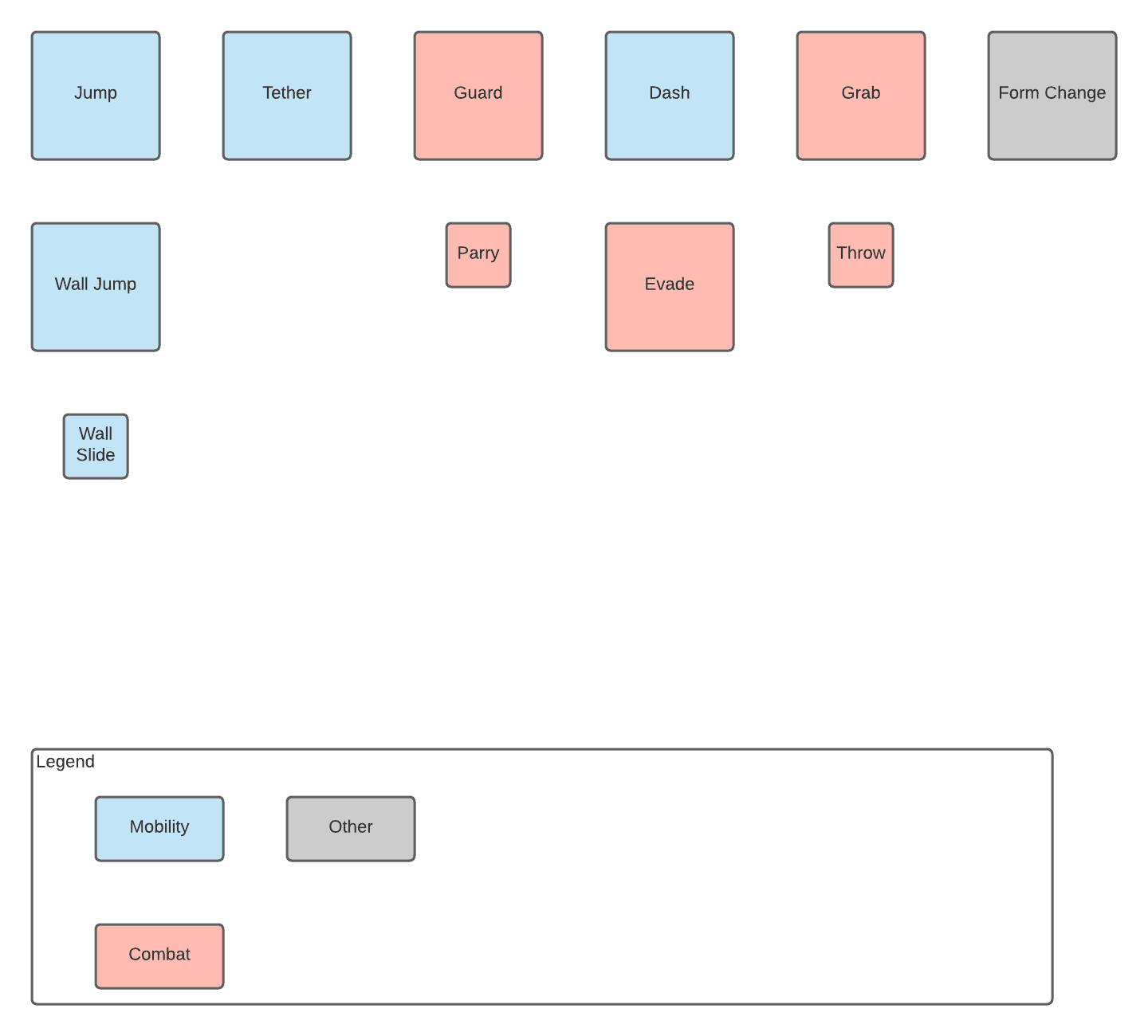
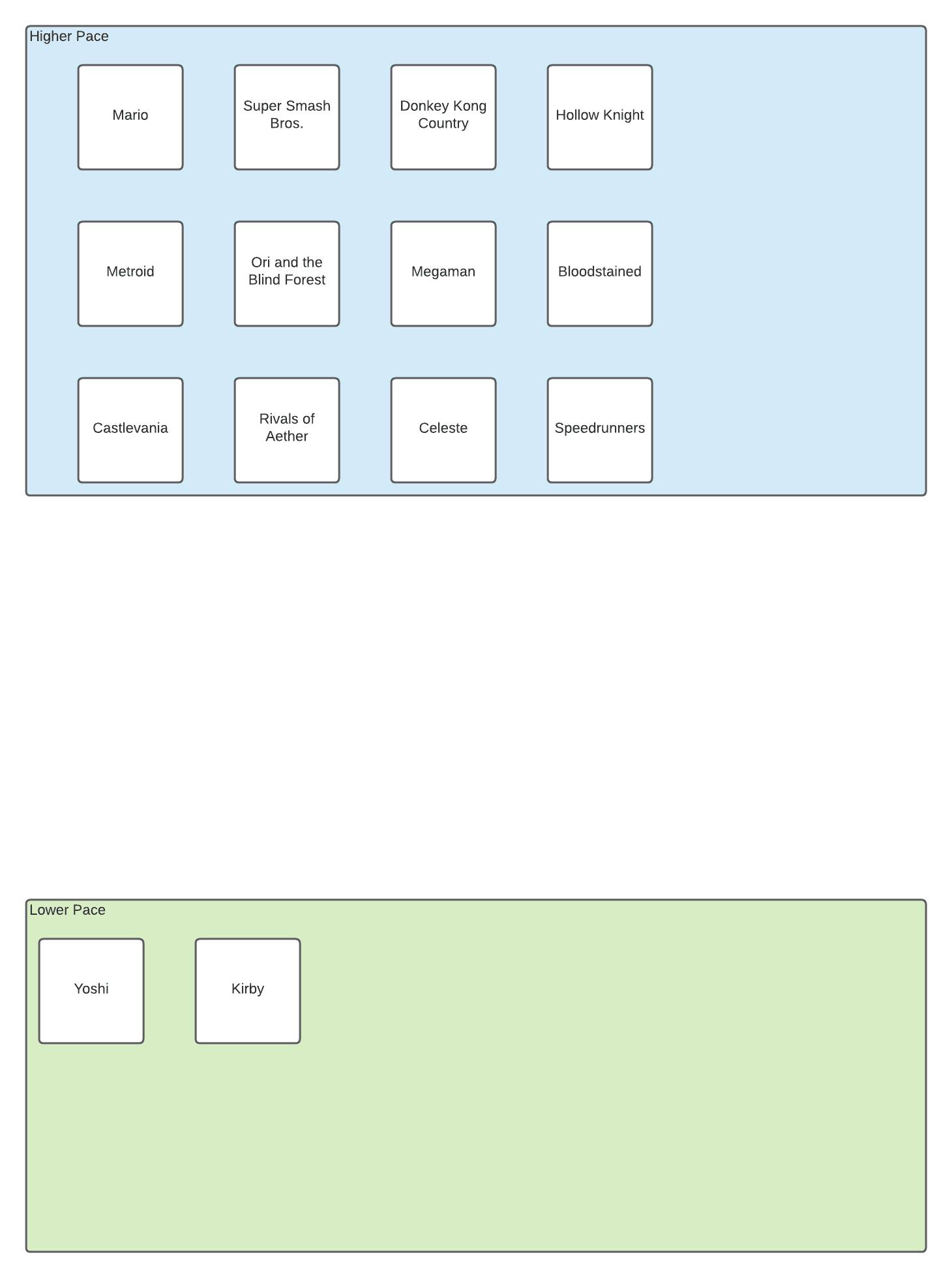
Since I want to make a strong character controller creating tool, I want to gather good resources to draw from to see what different components I want to include in the tool. To start this, I began laying out all the basic components that I think can make up a 2D platforming character in a game that I am interested in covering. To support this, I have also began listing games with strong or unique 2D platforming character controllers that I want to draw options and information from. This are shown below in the images created with Ludicchart (these are just the beginnings to start getting the information down and figure out how to start organization).

2D Platformer Character Controller Components: Start


Games to Research and Draw Inspiration

As I started to fill in the games, I noticed that some of them are distinctly different in what I consider pacing so I decided to separate those out for now. Recent Yoshi games and most Kirby games tend to be a bit easier on the difficulty side, especially compared to a lot of games on my list, which I think in turn makes them feel a bit lower paced. This may not be the most accurate term, as there are times a game such as Hollow Knight can be a bit slower paced, but I do not think it has anywhere near the feel that Yoshi and Kirby games has I am trying to convey.

Summary

So far Lucidchart has been fantastic just for visually organizing my thoughts and notes so far. The components are very cleanly organized because I can lay out the major component names, while attaching notes to those individual components to give a longer description as well as some game examples to explain them better.

via Blogger http://stevelilleyschool.blogspot.com/2021/01/planning-and-designing-2d-character.html